
-
PyCon 2008 Wrap-Up Mar 20, 2008
At PyCon 2008, I co-presented a talk, Supervisor as a Platform. The talk was well attended and the audience even included Python creator Guido van Rossum. We received a lot of positive feedback about our recent work and I suspect we picked up a good number of new users as well.
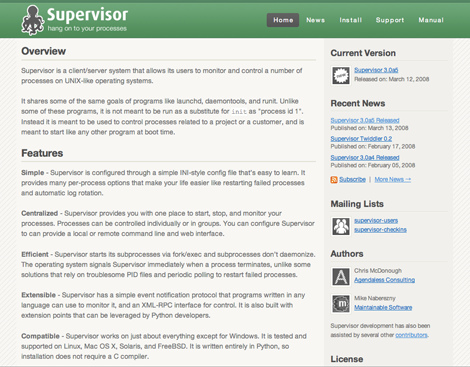
About two months ago, we began a push to build quality documentation for Supervisor using Docbook. After this was complete, we set out to build a new web presence. Our efforts culminated at PyCon 2008 when we unveiled the new Supervisor website.
PyCon was also very productive, with hacking on Supervisor, Repoze, and general WSGI fun. I worked on a new feature to allow Supervisor’s process group configurations to be reloaded without restarting Supervisor. Meanwhile, Chris made
supervisorctlpluggable so extensions can add new commands to the Supervisor command line.I also attended quite a few interesting talks, met some new people, enjoyed hanging out with usual the Zope and Plone folks, and overall just had a good time. PyCon 2008 was great conference and I’m looking forward to next year.
-
PyCon 2008: Supervisor as a Platform Mar 16, 2008
We presented Supervisor this week at PyCon 2008. We enjoyed meeting many new users and hearing how Supervisor has helped you. Thanks for your support.
If you didn’t make it to PyCon, here’s an overview of our talk:
Supervisor is a tool for managing UNIX processes. Supervisor starts arbitrary processes at its own startup and allows otherwise unprivileged users to start, stop and restart its subprocesses and view its subprocess’ logs using a command line or web interface. Other programs exist which do this, but what sets Supervisor apart is that it is written in Python and built with extension points that can be leveraged by Python developers. In this talk, we’ll look at Supervisor as a platform, and how Python programs written to run under Supervisor can use its unique capabilities.
You can now download the slides from our talk in PDF format.
-
Ruby Block Scope Feb 18, 2008
Ruby’s blocks, or closures, are a feature that does not have a direct equivalent in PHP. We devote a fair number of pages to this topic in the book. Even so, it will take a bit of time and practice before you feel completely comfortable with them. Let’s take a look at an easy way that Ruby’s block scoping might trip you up.
In this example, we have an array of fruit. We want to iterate through the array and print the name of each fruit. At the end, we want to print the name of the last fruit again.
$fruit = array('apple', 'banana', 'orange');
foreach ($fruit as $f) { print "$f, "; }

print $f;
Note: the purpose of this and the following examples is to demonstrate variable scoping. They are not intended to be the shortest or most efficient ways to perform the tasks.
As you probably expected, here’s the output of the above program:
apple, banana, orange, orange
This works because PHP has simple scoping rules. Within a function, any variables that get defined are available any time later in the function. Variables defined before constructs like
foreach()andwhile()are available inside those constructs. Variables defined inside those constructs are defined in the same scope and are available outside of those constructs, like $f above.When you first start writing programs in Ruby, you’ll probably start out by converting bits of your PHP programs over before you get into the swing.
With that in mind, let’s now try directly converting our PHP program to Ruby:
fruit = %w[apple banana orange]
fruit.each { |f| print "#{f}, " }

print f
If you’re wondering about the
%w, that’s a word array (see Useful Perlisms in Ruby for this and other tricks). Otherwise, this looks very similar to the PHP version.However, you might find the results to be unexpected:
apple, banana, orange,
NameError: undefined local variable or method 'f'
In Ruby, scoping is lexical. There can be many levels of scope and scope can even be manipulated. When a block is called in Ruby, it is bound to the scope of its caller. This means that within the same method, variables defined above the block are available inside the block. However, variables defined within the block are not normally available outside the block. In the example above, Ruby raised a
NameErrorbecausefwas only defined within the block, not above it.If you really needed to do the example in Ruby, you could define a variable above the block to store the last value through the iteration.
fruit = %w[apple banana orange]
last_fruit = nil

fruit.each do |f|
  print "#{f}, "
  last_fruit = f
end

print last_fruit
Since the
last_fruitvariable is defined above the block, it is available both inside and below the block. The program now works as you might expect.While that helps us begin to understand Ruby’s scoping and gets the job done, a much simpler and more idiomatic Ruby solution for this particular problem would be this:
fruit = %w[apple banana orange]
fruit.each { |f| print "#{f}, " }

print fruit.last
The
Array#lastmethod is the equivalent of PHP’send(). By just using it instead, our code is both more concise and readable. -
Supervisor Twiddler 0.2 Feb 17, 2008
Supervisor Twiddler is an RPC extension for Supervisor that allows Supervisor’s configuration and state to be manipulated in ways that are not normally possible at runtime.
Changes in release 0.2:
Renamed
addProcessToGroup()toaddProgramToGroup(). The method
now supports program definitions withnumprocs> 1 and will add
all resulting processes from the program definition. It also
fixes a bug where the process config was not added to the group
properly. Requested by Roger Hoover.Added new method
log()that writes an arbitrary message to the
main supervisord log. This is useful for recording information
about your twiddling.You can download the new version from PyPI.
-
Horde/Yaml 1.0 Released Jan 8, 2008
Horde/Yaml is a PHP 5 library for easily working with YAML data. This is the package’s first stable release.
Chuck Hagenbuch started the library as an adaptation of Spyc around six months ago. Since then, he and I have been quietly using and improving it. Along the way, we fixed many issues, added support for pecl/syck, and wrote a test suite with PHPUnit.
There are a couple of other libraries also derived from Spyc, notably the
sfYamlclass from the Symfony framework. Since these efforts also found and corrected issues, we incorporated as many of these fixes as we could find and added them to the test suite as we went along.At work, we frequently use YAML files for configuring our custom applications because our clients tend to like the format more than the alternatives. We’ve been using Horde/Yaml successfully for quite some time so we think it should generally work well for you also.
There’s a nice tutorial on working with YAML in PHP 5 over on the new Rails for PHP Developers website. It includes everything you need to get started with Horde/Yaml.
-
PHP, Meet YAML Jan 8, 2008
Just about every PHP application needs some kind of configuration, if only to define the connection to a database. One popular way to store configuration is to use a PHP file itself because it’s convenient and fast for PHP to read. This approach is taken by the Solar PHP Framework and many others.
However, while PHP is convenient for us as developers, it’s often inconvenient for others. For example, we often leave the task of deploying and configuring our applications with system administrators. For those sysadmins without PHP knowledge, it’s easy to become frustrated by a missing quote, parenthesis, or semicolon in a PHP file.
Introducing YAML
Besides PHP itself, the most popular config file formats for PHP applications are INI and XML files. More people understand these formats, but these have problems of their own. The INI format is easy-to-use but not great at representing hierarchical data. XML improves on hierarchical data but is not nearly as easy-to-use as INI.
YAML is a relatively new format that has been pioneered by the Ruby and Rails communities. It blends the best aspects of XML and INI, giving us a format with the flexibility of XML and the ease-of-use of INI.
Here’s what a snippet of YAML looks like:
development:
  adapter:  mysql
  socket:   /tmp/mysql.sock
  encoding: utf8
  database: newsletter_development
  username: the-username
  password: the-password
The YAML site has a more complex example showing what’s possible.
All Rails applications use the same
config/database.ymlfile to configure the database connection. The snippet above was taken from Chapter 1 in the book, where we developed a simple newsletter application using Rails.Let’s explore Ruby’s built-in YAML support and then look at it from a PHP perspective.
Ruby’s YAML Support
One of the strengths of Rails is that it is built on a foundation of solid Ruby tools. Rails got the ability to read YAML files for free because YAML support is bundled with Ruby. Fire up IRB and try it yourself:
irb> require "yaml"
=> true
irb> h = YAML.load("foo: bar\nbaz: qux")
=> {"foo"=>"bar", "baz"=>"qux"}
irb> h["foo"]
=> "bar"
Above, we put a YAML document into a string. The
YAML.loadmethod then parses it into a Ruby hash, which is simple to use.If you have a Rails application handy, such as the newsletter or user group apps from the book, change to the application’s base directory and try this from IRB:
irb> require "yaml"
=> true
irb> h = YAML.load_file("config/database.yml")
=> {"development"=>{"adapter"=>"mysql", "encoding"=>"utf8" ... }
irb> h['development']['database']
=> "newsletter_development"
You can see it’s relatively painless for Rails to read the
config/database.ymlfile just with the YAML support included with Ruby.PHP and YAML
PHP 5 includes built-in support for reading many different formats including INI, XML, and JSON. Unfortunately, YAML support is not yet bundled with PHP like it is with Ruby.
A few different solutions have appeared to fill this gap. One is pecl/syck, a fast PHP extension that provides bindings to the Syck library written in C.
Perhaps the best at this time is Horde/Yaml. This library is PHP 5 E_STRICT complaint, uses the familiar PEAR coding standards, and is based on Spyc. Horde/Yaml includes a number of bug fixes, cleanup, and will transparently use pecl/syck if it is available.
Now, we’ll do the same exercises from above but with PHP and Horde/Yaml.
Installing Horde/Yaml
The Horde/Yaml library is distributed as a PEAR package, the analog of RubyGems.
To install it, run these commands from your shell. If you’re on a Unix-like machine, you will probably have to add sudo before these commands.
shell> pear channel-discover pear.horde.org
shell> pear install horde/yaml
If installation is successful, you should see
install ok.Using Horde/Yaml
Horde/Yaml, like many newer PHP 5 libraries, does not explicitly use require to load its files. Instead, it uses autoloading. If you’re unfamiliar with this or don’t yet have an autoloader set up, adding something like this to the top of your script will get it working:
function sample_autoloader($class) {
    require str_replace('_', '/', $class) . '.php';
}
spl_autoload_register('sample_autoloader');
With that out of the way, Horde/Yaml is ready to go.
Let’s look at the equivalent of the first Ruby example, where a string containing YAML is loaded into a PHP associative array:
$a = Horde_Yaml::load("foo: bar\nbaz: qux");

var_export($a);
The
Horde_Yaml::load()method parses YAML into a variable, just like its Ruby counterpart. The output ofvar_export()is:array ( 'foo' => 'bar', 'baz' => 'qux', )
Horde/Yaml can also read from a file with
loadFile()or an open stream withloadStream().That’s all you need to start reading YAML in PHP.
Notes
Be careful in your PHP applications that sensitive YAML files are not web-accessible. Keep them outside of the document root or use an
.htaccessfile if that’s not an option. If you don’t, your web server will give them to anyone who requests.This article focuses on reading YAML, but both Horde/Yaml and Ruby’s built-in YAML support can dump data structures into YAML. Just pass a hash (associative array) to the
dump()method of either to get the equivalent YAML string. -
Useful Perlisms in Ruby Jan 3, 2008
PHP syntax shows obvious similarities to Perl. For example, we have the prefixing of variables (
$), the arrow for object access (->), and semicolons terminating our statements. While it’s perhaps less obvious to PHP developers at first, Ruby’s syntax has also been influenced by Perl in various ways.Ruby has quite a few interesting syntax features, some inspired by Perl and some not, that are sometimes lumped together as the “Perlisms” in Ruby. Let’s explore a few of the more useful ones you’ll likely encounter in Rails applications.
Word Arrays
Ruby has a very convenient syntax for arrays:
days = ['Mon', 'Tue', 'Wed', 'Thu', 'Fri']
However, if your array elements are words (no spaces), you can do one better.
days = %w[Mon Tue Wed Thu Fri]
The
%warray modifier allows you to write more readable arrays of words by omitting the noise of the quotes and commas.Regular Expression Matches
In PHP, regular expressions are written inside strings. These strings are passed to functions like
preg_match()that perform the matching:$text = 'You have 12 new messages'; if (preg_match('/(\d+) new/', $text, $matches)) { print "Found {$matches[1]} messages"; }Ruby’s regular expressions aren’t written inside strings because they have a native syntax supported by the language. We can write the above example as:
text = 'You have 12 new messages'

if matches = /(\d+) new/.match(text)
  puts "Found #{matches[1]} messages"
end
Since
/(\d+) new/is itself an object, we can call the match method on it. The snippet otherwise looks similar to the PHP version.However, there’s another way:
text = 'You have 12 new messages'

puts "Found #{$1} messages" if text =~ /(\d+) new/
You can use the
=~operator to test if a regexp matches and!~to test if it doesn’t. Also, Ruby automatically assigns the regexp matches to special variables.$1is the first match,$2is the second match, and so on.Finally, we reversed the conditional to shorten the snippet a bit.
Grouping Thousands
Have you ever needed a fairly large numeric literal?
bytes = 1048576
You might appreciate that Ruby allows you to use underscores in numbers.
bytes = 1_048_576   # Ruby's Grouping

bytes = 1.megabyte  # Rails' ActiveSupport
You can use the underscore to group thousands or whatever you like, and Ruby will just filter it out. For common numbers like byte multiples, Rails takes it to another level of readability with special methods like
megabyteshown above.Parting Thoughts
There’s quite a few other so-called Perlisms in Ruby. Some are great, and some aren’t so great. For example, you can access Ruby’s load path with the readable
$LOAD_PATHvariable or the cryptic$:variable. This post from Nick Seiger has some really obscure features of Ruby.Ruby’s language design makes programming very convenient, but it’s power is that its allows us to write intuitive programs that often read like natural language. When you abuse the syntax features, you only make code harder to read.
Experienced PHP developers learn that there are some aspects of the PHP language, deprecated or not, that you might want to avoid for cleaner code. This is sometimes true of Ruby also, as with most programming languages.
While the features demonstrated above are useful and popular, some features of Ruby aren’t popular in the Rails community at all. Most of the pre-defined variables that aren’t words fall into this category. In general, Rails developers always strive to write programs that are easier to understand and maintain.
Becoming an effective Rails developer is not only learning the features of the Ruby language, but developing a sense of good taste for how to use those features.
-
Supervisor at PyCon 2008 Dec 21, 2007
I’ll be presenting at PyCon 2008:
Supervisor is a tool for managing UNIX processes. Supervisor starts arbitrary processes at its own startup and allows otherwise unprivileged users to start, stop and restart its subprocesses and view its subprocess’ logs using a command line or web interface. Other programs exist which do this, but what sets Supervisor apart is that it is written in Python and built with extension points that can be leveraged by Python developers. In this talk, we’ll look at Supervisor as a platform, and how Python programs written to run under Supervisor can use its unique capabilities.
Our talk will cover basic usage but will focus on the more advanced features we’ve added recently, such as adding custom RPC interfaces and event listeners.
PyCon 2008 will in Chicago on March 13-16th. From the list of talks, it looks like this is going to be a great conference. I am especially looking forward to pounding out some new code during the sprints following the conference on the 17-20th.
-
Rails Hackfest Winner Dec 5, 2007

I was pleased to learn today that I am a winner in the Rails Hackfest.
The Hackfest is a contest where your ranking is primarily determined by how many of your patches get accepted into Rails core during the contest month.
-
Supervisor Extensions Released Nov 5, 2007
Supervisor is a process management system written in Python.
One of the major features we added to Supervisor recently is the ability to extend its XML-RPC interface functionality by registering new top-level namespace factories.
Today, I released two new extension packages for Supervisor:
- Supervisor Twiddler allows Supervisor’s configuration and state to be manipulated in ways that are not normally possible at runtime.
- Supervisor Cache provides the ability to cache arbitrary data in the Supervisor instance as key/value pairs.
Both of these packages add capabilities to Supervisor through this new extensibility. Since they are the first packages available of their kind, they also serve as a template for building your own Supervisor extensions.
Search
Links


Contact
Categories
Articles
- Applying Ruby's Blocks
- Deploying on Phusion Passenger
- Fail Early
- Ruby Block Scope
- PHP, Meet YAML
- Useful Perlisms in Ruby
- Wrap PHP Functions for Testability
- DRY up Rails testing with Autotest
- Rails Logging Tips
- Easier XML-RPC for PHP 5
- Introducing Zend Framework
- Custom Rescue Templates
- X-10 FireCracker CM17A Control
- Reading the Sharp GP2D02
- Build a 6504-based Microcomputer